Cart is empty
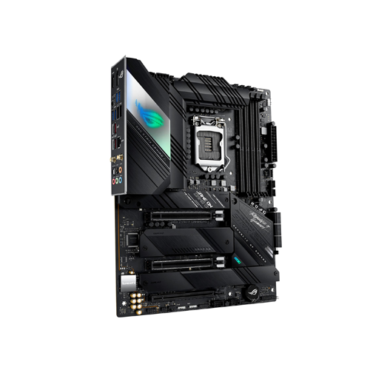
ROG STRIX B550-F GAMING (WI-FI)
Rs. 62,222.00
BIOS update might require for AMD Zen 3 Ryzen 5000 series CPU
AMD AM4 Socket and PCIe 4.0: The perfect pairing for 3rd Gen AMD Ryzen CPUs
Robust Power Design: 12+2 DrMOS power stages with high-quality alloy chokes and durable capacitors to provide reliable power for the latest high-core-count AMD CPUs
Optimized Thermal Solution: Fanless VRM and chipset heatsinks with ASUS Stack Cool 3+ design keep your system running reliably under heavy load by enhancing passive cooling capacity for critical onboard components
High-performance Gaming Networking: On-board WiFi 6 (802.11ax), Bluetooth V5.1 and 2.5 Gb LAN with ASUS LANGuard
Best Gaming Connectivity: Supports HDMI 2.1 (4K@60HZ) and DisplayPort 1.2 output, plus dual M.2 slots (NVMe SSD) – one with PCIe 4.0 x4 connectivity, USB 3.2 Gen 2 Type-C port and Thunderbolt header
03 Years Agent Warranty
Out of stock
- ProCool Power Connector
- AMD Socket AM4 for 3rd Gen AMD Ryzen™ Processors
- Multi-GPU CFX Support
- 1 x PCIe 4.0 x16 SafeSlot (x16) [CPU]
- 1 x PCIe 3.0 x16 slot (x4) [CHIPSET]
- 3 x PCIe 3.0 x1 slots [CHIPSET]
- 12+2 Power Stages
- DDR4, 4 x DIMM
- ASUS OptiMem II
- Dual Channel
- 2 x M.2 Sockets
- 1 x M.2 2242-22110 supports PCIe 4.0 x4 & SATA modes
- 1 x M.2 2242-22110 supports PCIe 3.0 x4 & SATA modes
- VRM Heatsink
- AIO Pump Header
- Dual M.2 Heatsinks
- Chipset Heatsink
- Multiple 4-pin PWM Fan Headers
- I/O Zone Aura Lighting
- SupremeFX S1220A CODEC
- Impedance sense
- High quality output and input
- SupremeFX shielding
- Dual OP amplifiers
Sonic Studio III + Sonic Studio Virtual Mixer Sonic Radar III
DTS® Sound Unbound - 1 x 3-pin Addressable Gen 2 RGB Header
2 x 4-pin AURA RGB Headers - BIOS FlashBack™ Button
- 2 x USB 2.0 Ports
- 2 x USB 3.2 Gen 2 Ports
- 1 x Type-A + 1 x USB Type-C®
- 4 x USB 3.2 Gen 1 Ports
- 1 x Intel® I225-V 2.5Gb Ethernet
- 1 x DisplayPort 1.2
1 x HDMI™ 2.1 (4K@60Hz) - Intel® Wi-Fi 6 AX200
- Optical S/PDIF Out
- 5 x Audio Jacks
- 2 x USB 3.2 Gen 1 Ports
- 6 x SATA 6Gb/s
- Thunderbolt Header
- Improved memory stability and compatibility
- Allows lower memory latencies at equivalent voltages
- Improved memory frequency margin

ROG Strix B550 Gaming series motherboards offer a feature-set usually found in the higher-end ROG Strix X570 Gaming series, including the latest PCIe® 4.0. With robust power delivery and effective cooling, ROG Strix B550 Gaming is well-equipped to handle 3rd Gen AMD Ryzen™ CPUs. Boasting futuristic aesthetics and intuitive ROG software, ROG Strix B550-F Gaming (Wi-Fi) gives you a head start on your dream build.
Built for Performance Gaming

Comprehensive Cooling

Total Gaming Immersion

Full Connectivity

ROG Strix B550-F Gaming (Wi-Fi) is PCIe® 4.0-ready and provides the latest connectivity options for supersmooth networking and blisteringly fast file transfers. Audio enhancements give you a massive advantage, allowing you to pick up on the subtlest of cues for a completely immersive gaming experience.

PCIe 4.0-Ready
ROG Strix B550-F Gaming (Wi-Fi) features two M.2 slots, one of which supports the latest PCIe 4.0 standard to provide maximum storage flexibility and the fastest data speeds available via the 3rd Gen AMD Ryzen platform. Both M.2 slots support up to the type 22110 socket and NVM Express® RAID for a performance boost.
Bandwidth [MB/s]
8066
PCIe 3.0 x 4
4032
*The actual transmission speed will be lower than the theoretical maximum speed.


Onboard WiFi 6 (802.11ax) supports ultrafast wireless-networking speeds, improved capacity and better performance in dense wireless environments, providing exceptional online gaming experiences. Pair your motherboard with ASUS WiFi 6 routers to fully experience the networking potential of WiFi 6.

Onboard 2.5 Gb Ethernet gives your wired connection a boost, with speeds that are 2.5 times faster than standard Ethernet connections for speedy file transfers, lag-free gaming, and high-res video streaming.
Built-in ROG SupremeFX audio technology ensures pristine audio for ROG Strix B550-F Gaming (Wi-Fi). Along with ensuring a flat frequency response for a neutral, detailed sound signature, it offers two front-panel outputs driven by op amps that deliver high-quality audio to gaming headsets.

Exceptional RMAA Performance
113dB
Standard ALC1220
108dB


With two op-amps onboard you’re able to pump exceptional audio to your favorite cans, with 32-600Ω-headphone impedance for great flexibility.
AI noise-canceling microphone software is exclusively featured on ROG Strix motherboards and supports 3.5 mm, USB, or Bluetooth headsets. The utility leverages a massive deep-learning database to preserve the sound of your voice while eliminating distracting keyboard clatter, mouse clicks, and other forms of environmental noise. And it only places a slight load on the CPU, ensuring minimal impact on gaming performance.


*Actual performance varies by configuration
.jpg) 0:18
0:18.jpg) 0:18
0:18 Background noise
 Other human voice
 Human speech
Sonic Studio supports HRTF-based (head-related transfer function*) virtual surround for VR headsets, casting an immersive aural landscape that draws you deeper into the action. The intuitive Sonic Studio interface also offers a range of EQ options and one-click presets, allowing you to tailor acoustics to suit personal preferences or the characteristics of your headset.


The new Sonic Studio Link allows you to apply Sonic Studio effects on all playback devices. Simply press the Sonic Studio Link button to enjoy the effect on any connected device.


ROG Strix B550 series motherboards are pre-loaded with the DTS® Sound Unbound™ app that envelops you in audio as never before, conjuring whole new levels of immersion for extraordinary gaming and entertainment experiences. By leveraging Windows Sonic spatial technology, DTS Sound Unbound delivers audio in a virtual 3D space — putting you right in the middle of the soundscape, where you can sense the location and direction of every gunshot, footstep or other sound in your virtual environment.
* DTS Sound Unbound requires in-game support. Check with developers for supported titles.


Discrete left and right audio channels enable headphone or two-speaker setup.
Audio is split and served over multiple speaker channels – e.g., 5.1 or 7.1 – to create an enveloping experience on a single, logical plane.
A virtual audio ‘sphere’ effect creates astonishing 360° immersion — with you at the center, where sounds seem to travel in all directions.
ROG Strix B550-F Gaming (Wi-Fi) provides robust power delivery to fuel Ryzen’s cores, comprehensive cooling, and support for faster memory — so it has everything you need to load up your build with high-performance components for playing in the big leagues.


POWER DESIGN
Digital power control and an array of power stages ensure ROG Strix B550-F Gaming (Wi-Fi) has the muscle to control the latest AMD CPUs.


ROG Strix B550 series features the most comprehensive cooling options ever, configurable via Fan Xpert 4 or the UEFI BIOS.


A dedicated pair of PWM/DC fan headers for CPU coolers
A dedicated PWM/DC header for self-contained water-cooling setups


Keeps the M.2 SSD at the optimum operating temperature for consistent performance and reliability


All onboard headers support auto-detection of PWM or DC fans


MOS heatsink provides large contact area for MOSFETs and chokes
High-quality thermal pad helps transfer heat from inductor and phase array to heatsink

ASUS OptiMem II
ASUS OptiMem memory trace layout unleashes the full performance potential of AMD’s Infinity Fabric architecture by enabling higher memory frequencies and lower latencies.
ASUS OptiMem advantage:
26% Reduction in crosstalk
ASUS OptiMem
53.12 V*pS
Reference design
72.51 V*pS
ASUS OptiMem benefits:
Tested with Synopsys HSPICE simulation software
The cyberpunk-inspired aesthetics of ROG Strix B550-F Gaming (Wi-Fi) are accentuated by the bold slashes and cybertext. By pairing your rig with other products from the diverse ROG ecosystem, you can create a fully customized gaming setup that reflects your personal style.

UNDENIABLY ROG STRIX
ROG Strix B550-F Gaming (Wi-Fi) embodies the ROG spirit with eye-catching aesthetics, including the next-generation distorted ROG eye logo and recessed cybertext patterning etched on the I/O shroud. These new designs move ROG Strix boldly into the future, while clearly reflecting the series’ gaming roots.
OUTSHINE THE COMPETITION

ROG Strix motherboards deliver sterling performance and superior aesthetics to outshine the competition. They also feature built-in ASUS Aura technology that enables full RGB lighting control and a variety of presets for embedded RGB LEDs as well as lighting strips connected to onboard RGB headers. In addition, all lighting can be easily synced with an ever-growing portfolio of Aura-capable ASUS hardware.


ROG Strix B550-F Gaming (Wi-Fi)’s Addressable Gen 2 RGB header is now capable of detecting the number of LEDs on second-gen addressable RGB devices, allowing the software to automatically tailor lighting effects to specific devices. The new header also offers backward-compatibility with existing Aura RGB gear.

Patented I/O shield is finished in sleek matte black and comes pre-mounted to make it easy to install on the motherboard.


Four onboard LEDs indicate power status, and any problem with the CPU, memory, graphics card or boot device for quick diagnosis.
The reinforced ASUS SafeSlot provides stronger PCIe device retention and greater shearing resistance.
Users can place a BIOS file onto a FAT32-formatted USB drive and simply plug it into the USB BIOS FlashBack™ port and press a button to update the (UEFI) BIOS. Updates can be made even if memory or CPU aren’t present.

ROG Strix motherboards undergo an extensive certification program to ensure the very best compatibility with the widest range of components and devices. For a smooth build process, refer to our list of guaranteed-compatible components. To help with memory upgrades, the list also includes a dedicated Qualified Vendor list (QVL).
ROG-exclusive software utilities deliver intuitive audio tuning and gaming enhancements that allow you to configure your gaming build the way you want.
The renowned ROG UEFI (BIOS) provides everything you need to configure, tweak, and tune your rig. It offers intelligently simplified options for newcomers to PC DIY, as well as comprehensive features for seasoned veterans.
When you’re ready for a deeper dive into the configuration of your system, delve into the UEFI’s Advanced mode and take complete control. Each section is intuitively organized, and a built-in search feature makes it easy to find the options you need. Advanced functions are coded with the intelligence to adapt to your settings, and when you’re ready to take charge, parameters have the granularity to dial in performance just the way you want.

Quickly find tuning options and add preferred tools to the list.
EZ FLASH 3
Flash the latest BIOS via the internet from within the BIOS.
S.M.A.R.T
Check your storages devices’ Self-Monitoring, Analysis, and Reporting Technology logs to gauge reliability and to identify potential failures.
GPU POST
Automatically detect selected ASUS graphics cards to view detailed information.
SECURE ERASE
Restore your SSDs to factory-fresh condition.
LAST MODIFIED LOG
Track the latest changes and save preferred profiles onto a USB drive.
SATA PORT RENAMING
Rename SATA ports for easy identification.
SEARCH FUNCTION
Quickly and easily find the option or setting you’re looking for.
ASUS USER PROFILE
Port configuration settings between different BIOS versions or share them with friends.
Q-FAN CONTROL
Configure the fan’s operating speed manually or use pre-configured fan profiles to quickly select Standard, Silent, Turbo or Full Speed modes. By default, system fans will automatically switch to full speed if the temperature reaches 75°C.

Fine-tune individual fans simply by dragging a curve with the mouse.
SATA INFORMATION
Easily display SATA port details for device identification.
FAST AND EASY CLOCK ADJUSTMENT
Use the mouse to quickly change time and date settings.
The proprietary ROG GameFirst VI utility is designed to help all users — beginners, experts, and everyone in between — optimize network settings to ensure smooth online gameplay. New to this generation, GameFirst VI features AI-enhanced identification and boost technology to ensure faster and smarter network optimization.


Identification
GameFirst VI analyzes your usage patterns and the digital signatures of your applications and compares them to a database of over 200,000 apps. The database is regularly updated to ensure that apps are recognized.
Boost
GameFirst VI intelligently switches application priority and adjusts bandwidth accordingly, depending on the situation. When gaming, it accelerates and prioritizes game packets to give you supersmooth online gameplay — even when you’re streaming high-quality video to your audience or transferring large files.
Visualization
An intuitive graph gives you an overview of the network in real time. Simply click on the tab to view current bandwidth usage of each application, geolocation status of each network connection, and an analysis of each WiFi channel.


WiFi Quick Assist analyzes network information — including real-time bandwidth use — to generate a graph that provides a clear overview of current network status. When paired with a ROG router, WiFi Quick Assist lets you quickly scan your WiFi network to find the best channel; then you can use Game Boost to prioritize gaming devices and packets.

Armoury Crate is a new software utility designed to give you centralized control of supported gaming products, making it easy to tune the look and feel of your system. From a single intuitive interface, Armoury Crate lets you easily customize RGB lighting and effects for compatible devices and synchronize them with Aura Sync to create a unified lighting scheme across your system. You can also use Armoury Crate to download the user manual, drivers and software. In addition, Armoury Crate features a dedicated product registration page as well as a news feed to help you stay in touch with the gaming community.
*Windows 10 required for full Aura Sync functionality within Armoury Crate. For Windows 8 and earlier versions, standalone Aura Sync software is available for free download from the product support site.

Aura Sync


RAMCache lll software turns milliseconds into microseconds to boost game-load times. Fully compatible with the latest NVM Express® storage options, its uniquely intelligent technology effectively caches an entire storage device so that favorite games and apps launch at breakneck speeds.


| Brand | ASUS |
|---|---|
| Series | ROG |
| Model | STRIX B550-F GAMING (WI-FI) |
| CPU Socket Type | AM4 |
|---|---|
| CPU Type | Supports 3rd Gen AMD Ryzen Processors*
* BIOS update might require for AMD Zen 3 Ryzen 5000 series CPU. Refer to ASUS website for CPU support list. |
| Chipset | AMD B550 |
|---|
| Number of Memory Slots | 4×288pin |
|---|---|
| Memory Standard | DDR4 4400(OC) / 4133(OC) / 4000(OC) / 3866(OC) / 3600(OC) / 3466(OC) / 3200 / 3000 / 2800 / 2666 / 2400 / 2133
* Refer to www.asus.com for the Memory QVL (Qualified Vendors Lists). |
| Maximum Memory Supported | 128GB |
| Channel Supported | Dual Channel |
| ECC Supported | ECC Memory (ECC mode) support varies by CPU. |
| Buffer Supported | Un-buffered |
| PCI Express 4.0 x16 | 1 x PCI Express 4.0 x16*
* Actual support may vary by CPU. |
|---|---|
| PCI Express 3.0 x16 | 1 x PCIe 3.0 x16*
* Share bandwidth with PCIe3.0 x1_1, PCIe3.0 x1_2, PCIe3.0 x1_3. |
| PCI Express x1 | 3 x PCIe 3.0 x1 |
| SATA 6Gb/s | 6 x SATA 6Gb/s |
|---|---|
| M.2 | 3rd Gen AMD Ryzen Processors: 1 x M.2_1 socket 3, with M key, type 2242/2260/2280/22110 storage devices support (SATA & PCIe 4.0 x4 mode)AMD B550 Chipset: 1 x M.2_2 socket 3, with M key, type 2242/2260/2280/22110 storage devices support (SATA & PCIE 3.0 x4 mode)** When the M.2_2 Socket 3 is populated, SATA6G_5/6 ports will be disabled. |
| SATA RAID | 0/1/10 |
| Onboard Video Chipset | Supported only by CPU with integrated graphic |
|---|
| Audio Chipset | ROG SupremeFX High Definition Audio CODEC S1220A |
|---|---|
| Audio Channels | 7.1 Channels |
| LAN Chipset | Intel I225-V |
|---|---|
| Max LAN Speed | 10/100/1000/2500Mbps |
| Wireless LAN | Intel Wi-Fi 6 AX200 802.11a/b/g/n/ac/ax |
| Bluetooth | Bluetooth 5.1 |
| Back I/O Ports | 1 x Intel I225-V 2.5Gb Ethernet 1 x DisplayPort 1 x HDMI 2 x USB 3.2 Gen 2 (1 x Type-A+1 x USB Type-C) 4 x USB 3.2 Gen 1 2 x USB 2.0 1 x Optical S/PDIF out 5 x Audio jack(s) 1 x BIOS FlashBack Button(s) ASUS Wi-Fi module (Wi-Fi 802.11 a/b/g/n/ac and Bluetooth v5.0) |
|---|
| Onboard USB | 1 x USB 3.2 Gen 1 (up to 5Gbps) connector(s) support(s) additional 2 USB 3.2 Gen 1 port(s) 2 x USB 2.0 connector(s) support(s) additional 4 USB 2.0 port(s) |
|---|---|
| Other Connectors | 1 x CPU Fan connector(s) 1 x CPU OPT Fan connector(s) 3 x Chassis Fan connector(s) 1 x AIO_PUMP connector 1 x AAFP connector 2 x Aura RGB Strip Header(s) 1 x Addressable Gen 2 header(s) 1 x Thunderbolt header(s) 1 x System panel(s) 1 x Thermal sensor connector(s) 1 x Clear CMOS jumper(s) |
| Form Factor | ATX |
|---|---|
| LED Lighting | RGB |
| Dimensions (W x L) | 12.0″ x 9.6″ |
| Power Pin | 1 x 24-pin EATX Power connector(s) 1 x 8-pin ATX 12V Power connector(s) 1 x 4-pin ATX 12V Power connector(s) |
| Features | Multi-GPU Support: Supports AMD 2-Way CrossFireX TechnologySoftware Features: ROG Exclusive Software – RAMCache III – ROG CPU-Z – GameFirst VI – Sonic Studio III + Sonic Studio Virtual Mixer – Sonic Radar III – DTS Sound Unbound – Overwolf – Anti-virus software ASUS Exclusive Software Features Armoury Crate – Aura Creator – Aura Sync – AI Noise Cancelling Microphone AI Suite 3: – PPSU EPU DIGI+ VRM Fan Xpert 4 TurboV EVO – EZ update WinRAR UEFI BIOS ASUS EZ DIY – ASUS CrashFree BIOS 3 – ASUS EZ Flash 3 – ASUS UEFI BIOS EZ ModeASUS Special Features: Aura Sync – Standard RGB header(s) – Addressable Gen 2 RGB header(s) ASUS Q-Design – ASUS Q-DIMM – ASUS Q-LED (DRAM [yellow], CPU [red], VGA [white], Boot Device [yellow green) – ASUS Q-Slot ASUS Thermal Solution – Aluminum M.2 heatsink ASUS EZ DIY – BIOS FlashBack button – BIOS FlashBack LED – Clear CMOS header – ProCool – Pre-mounted I/O shield – SafeSlotBIOS: 256MB Flash ROM, UEFI AMI BIOSManageability: WOL by PME, PXEOperating System: Windows 10 64-bit |
|---|
| Package Contents | Accessories: User’s manual 4 x SATA 6Gb/s cable(s) 1 x Supporting DVD 1 x ROG Strix stickers 1 x Cable ties pack(s) 1 x Extension cable for Addressable LED 1 x ROG Thank you card 1 x Wi-Fi moving antenna 1 x M.2 SSD screw package(s) 1 x M.2 Rubber Package(s) |
|---|
| Date First Available | June 12, 2020 |
|---|